 BestSubscribers
How to Build a Profitable Email List on YouTube (7 Steps)
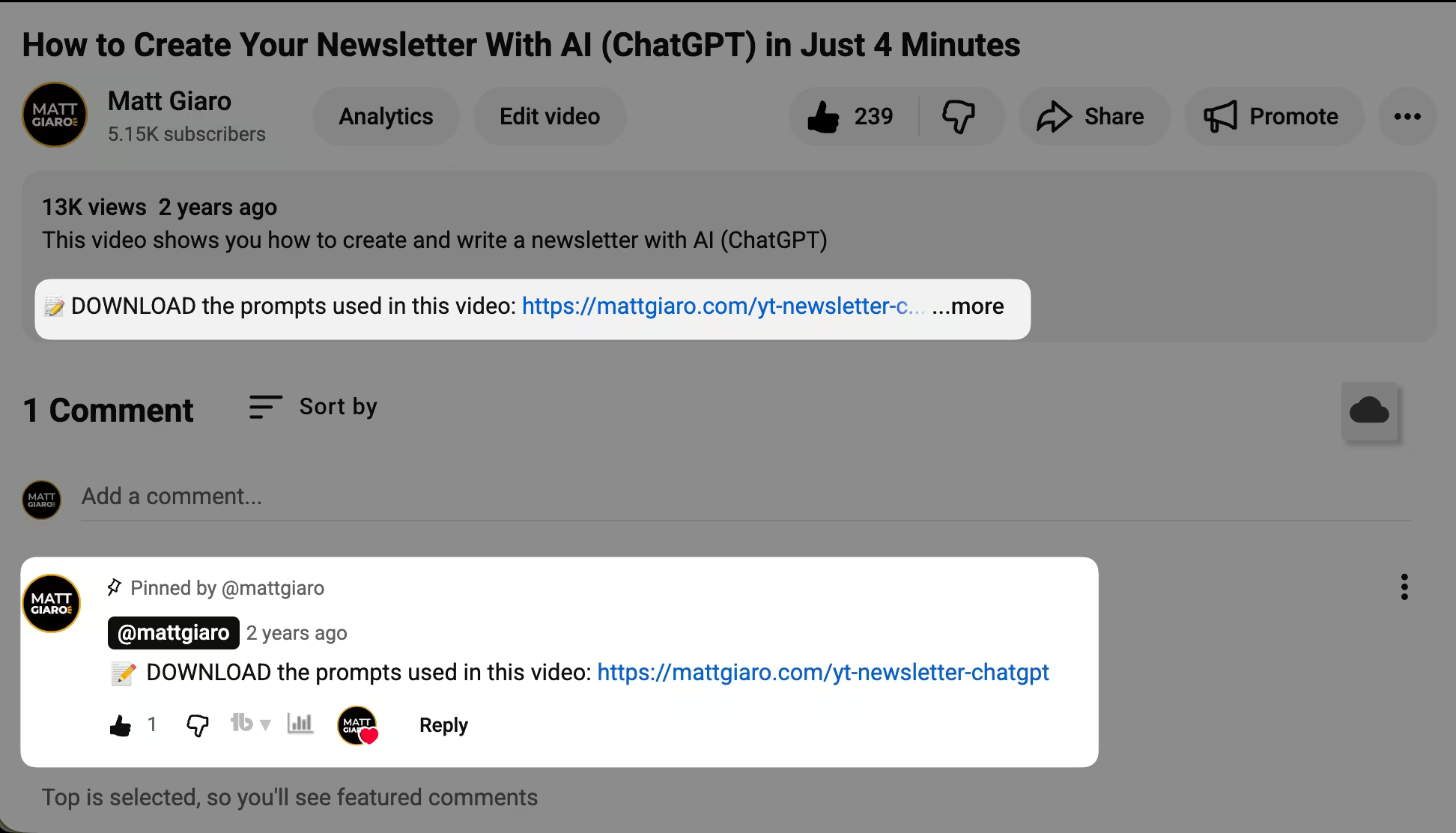
The most effective way to build an email list on YouTube is to treat every video as a subscriber acquisition event — with a specific lead magnet tied to the video topic in the description, the first pinned (and hearted) comment and mentioned out loud during the video.
I've started my first YouTube channel in 2014.
And the biggest lesson that decade taught me is that the videos bringing in the most views and the videos bringing in the most email subscribers who buy are almost never the same.
So here are 7 steps to turn YouTube viewers into email subscribers.
Why your email list matters more than YouTube subscribers
YouTube doesn't let you contact your viewers.
You can publish a video that gets 10,000 views. But you can't email those people. You can't send them your offer. You can't follow up when you launch a course. You're 100% dependent on the algorithm to show them your next video — and the algorithm doesn't owe you anything.
A client of mine has a YouTube channel with only 2,400 subscribers. Most of his videos get 1,000 views or less. He's pulling in $5,000 a month.
Not because he went viral. Because he's insanely relevant to a small group of people with a real problem they'll pay to solve — and he moves them onto his email list where he can actually sell stuff.
YouTube subscribers are rented attention. Email subscribers are owned. It has a 42x higher ROI than social media, according to DMA data.
Step 1 — Create a lead magnet for each video topic
"Subscribe to my newsletter" is the weakest call to action in existence.
Nobody wakes up thinking "I need to subscribe to more newsletters." People sign up because they want something specific:
- a checklist
- a template
- a quick fix to a problem they have right now.
That's what a lead magnet does. It's a free resource you offer in exchange for an email address.
The key that most guides miss: your lead magnet needs to be tied to the specific video topic. Not one generic freebie for your entire channel.
A specific one connected to what the viewer just watched.
If your video is about "5 mistakes new managers make," your lead magnet could be a one-page checklist of those mistakes with fixes. If your video covers "how to price your first online course," the lead magnet could be a pricing calculator prompt.
I learned this from one of my own videos.
I recorded a tutorial on how to create a newsletter with ChatGPT, showing the exact process and prompts.
The lead magnet? A cheat sheet with all the ChatGPT prompts from the video — so viewers didn't have to rewind and copy them one by one.
That video hit a 7.3% opt-in rate.
Why? Because the lead magnet was an extension of the content they just consumed. It wasn't some random PDF about "email marketing tips." It was the exact tool they needed to implement what I taught them.
What makes a lead magnet convert
Keep it short and consumable on a phone. Nobody's reading a 200-page ebook on their commute. A checklist, a cheat sheet, a one-page template — something they can use in under 5 minutes.
Solve one specific problem. If your lead magnet tries to fix ten things, it'll overwhelm people. Focus on the one takeaway from the video that viewers would want as a reference.
Give it a compelling name. "My Free Guide" converts worse than "The 7-Prompt Newsletter Blueprint (Copy-Paste Ready)." Specificity and implied speed sell.
Step 2 — Build a landing page that does one job
Your landing page exists for one purpose: collect the email address. Nothing else.
One headline that states the benefit. One short description. One email form. No navigation menu. No sidebar. No links to other pages.
Landing pages with a single CTA convert 266% better than pages with multiple options, according to WordStream data.
Every additional link is an exit ramp.
Set this up with whatever email platform you're already using — Kit, MailerLite, AWeber, or similar. All of them offer landing page builders that can automatically deliver your lead magnet after signup.
The whole thing should take you 15-20 minutes. Don't overthink the design. A clean page with a clear headline outperforms a beautiful page with a confusing message every time.
If you want a fast solution to create landing pages that convert, check out RocketSubs.
Step 3 — Put your link where viewers actually click
YouTube gives you several places to add your landing page link. Not all of them are equal.
Video description — the highest-converting placement
The first two lines of your description appear "above the fold" — visible without clicking "show more." This is prime real estate.
Put your lead magnet link in the very first line, with a clear reason to click: "Grab the free checklist: [link]."
Don't bury it below three paragraphs of timestamps and social links.
Pinned comment — underrated
Pin a comment on your own video with the lead magnet link. Comments are where engaged viewers naturally look. A pinned comment stands out visually and often gets more clicks than a description link because it appears in the social context of the video.
Channel banner and About section
Your channel banner is the first thing visitors see when they land on your channel page. Use it to promote your lead magnet, not just your upload schedule.
Noah Kagan found that 400x more people subscribe to a channel from the homepage than from individual videos. If that casual traffic lands on your channel page, your banner should give them a reason to join your email list.
Your About section can include a direct link to your landing page. Anyone curious enough to visit your About page is already interested — don't waste that attention.
Cards and end screens
YouTube cards are small pop-ups that appear during a video. End screens appear in the final 10-30 seconds.
Both can link to your landing page.
End screens typically drive 1-5% of traffic to landing pages.
That sounds small until you do the math: if your video gets 500 views per month for 3 years, even 2% is 360 landing page visits from a single video.
At a 30% landing page conversion rate, that's 108 email subscribers from one piece of content — on autopilot.
Step 4 — Say it out loud in every video
A verbal call to action inside the video converts better than any link placement.
Most creators make the mistake of saving it for the very end: "And don't forget to check the link in the description!" By then, 70-80% of viewers have already left.
Mention your lead magnet within the first 60 seconds. Not as a sales pitch — as a natural extension of the content.
Something like: "I'm going to walk you through this process step by step. And if you want the cheat sheet with all the prompts I'm using, I put a link in the description — it's free."
That framing does two things.
First, it tells viewers the resource exists before they've had a chance to click away. Second, it positions the lead magnet as helpful, not promotional. You're not asking for something. You're offering something.
Then mention it once more at the end for the viewers who stayed. Two touches, both natural, both tied to the content.
Don't say "subscribe to my newsletter."
Say "I made a free [specific thing] that helps you [specific result]."
The first sounds like a favor you're asking. The second sounds like a gift you're giving.
Step 5 — Make the right kind of videos
Not all YouTube content builds an email list equally.
After analyzing which of my YouTube videos actually brought in subscribers who became buyers, three patterns stood out.
Ultra-specific tutorials aimed at committed people
The videos that drove the most qualified subscribers weren't the broadest ones. They were the most specific.
"How to take book notes in Obsidian and remember everything you read" performed well for bringing in repeat buyers.
So did "how to write profitable blog posts in 45 minutes or less" — that one brought in only 10 subscribers, but 50% of them became repeat buyers.
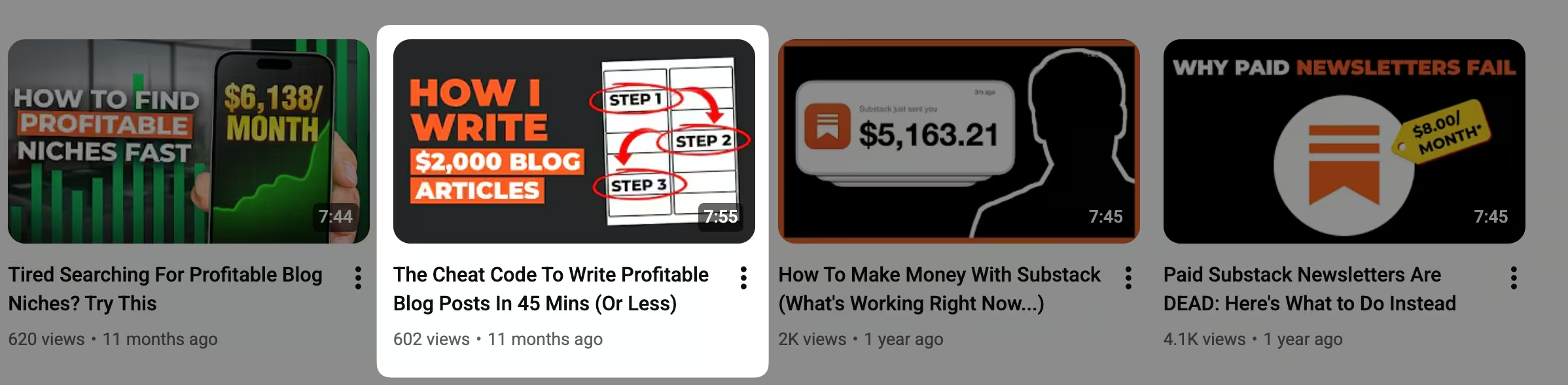
The pattern: tutorials geared toward people who've already decided to do something.
Not "should I take better notes?" but "how to take book notes in Obsidian."
They've passed the decision stage — they need the how. And people who are already committed are people who buy.
Compare that to my Google Trends video with 153,000 views. "How to find a niche" attracts everyone vaguely curious about making money online. It's the equivalent of opening your restaurant doors to every passerby in the city.
Lots of foot traffic. Zero paying customers. Totally useless.
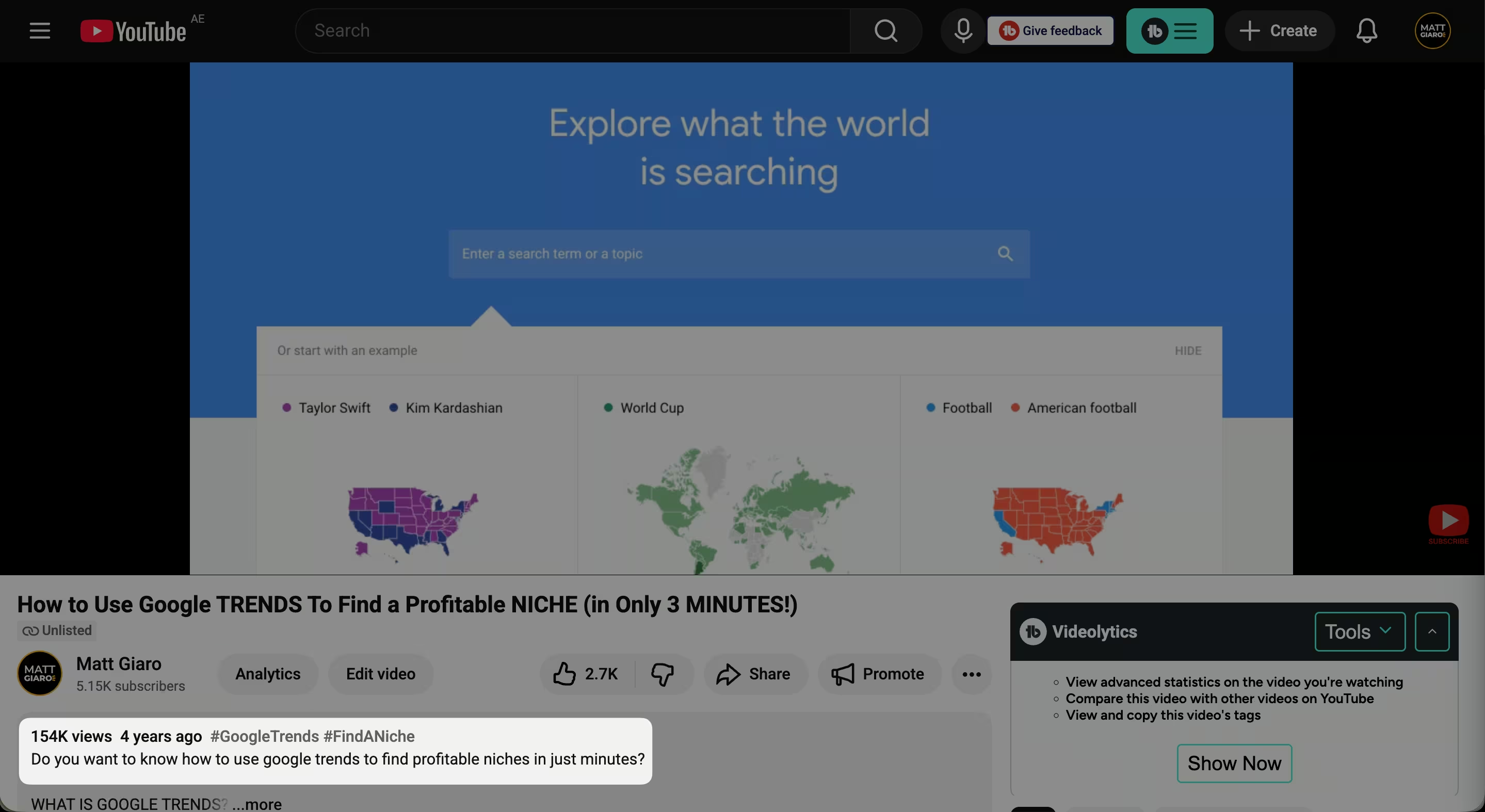
That's why I unlisted that video from my channel.
Contrarian angles
Videos like "Second brain: stop using CODE" and "Paid Substack newsletters are dead" also performed well for bringing repeat buyers. The contrarian frame attracts people who are already invested enough in a topic to have an opinion about it. Those people are further along the buying journey than someone watching a generic overview.
Search-based content that compounds
YouTube search works like Google search. A well-optimized video can bring subscribers for years after you publish it.
My blog gets 8-10K visitors per month on autopilot. My YouTube channel pulls 10-15K views per month. Combined, that's 240,000+ free eyeballs annually — without posting anything new.
The key is making search-based content: videos that answer specific questions people are actively typing into YouTube. Use YouTube's autocomplete bar — start typing a question in your niche and see what YouTube suggests. Those suggestions are real searches from real people.
Trending content gives you a spike and dies. Search content compounds. If you're building this around a job or a family and don't have hours to spare, compounding assets are how you win.
Step 6 — Email your list when you publish (but wait 1-3 days)
Your email list and your YouTube channel create a flywheel when used together.
When you publish a new video, send an email to your list letting them know. The initial burst of views from your email subscribers signals to YouTube's algorithm that this video is worth pushing to a broader audience. More algorithmic reach means more new viewers, which means more email subscribers, which means a bigger initial burst next time.
One timing detail: wait 1-3 days after publishing before emailing your list.
Give YouTube's algorithm time to surface your video to your YouTube subscribers first. If all your initial views come from email clicks (external traffic), YouTube may not credit those views the same way it credits organic discovery.
The email itself doesn't need to be fancy.
A short note saying "New video on [topic] — here's the link" works.
Your list already trusts you. They just need to know it exists.
Step 7 — Track which videos actually bring subscribers who buy
This is the step every other guide skips. And it's the one that matters most.
Most YouTube guides stop at "get the email."
But collecting email addresses is just the starting line. The real question is: which videos bring subscribers who become customers?
YouTube analytics can tell you which videos get watched.
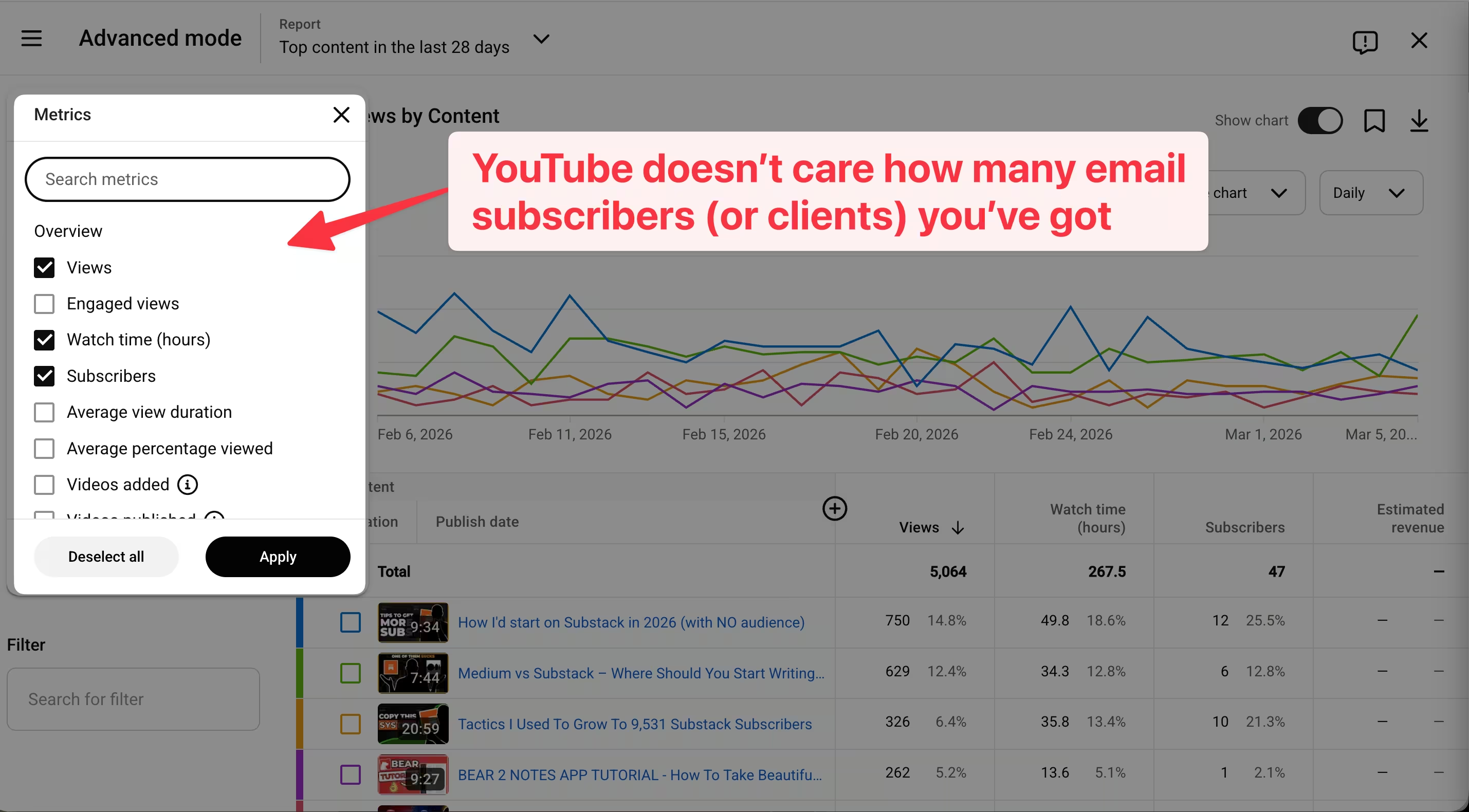
It cannot tell you which videos bring in email subscribers who buy your course, join your coaching, or purchase your product.
And once you start tracking this, you'll notice something that feels almost unfair: some videos pull in way more subscribers than others.
And some of those subscribers buy — while others never do.
I have a YouTube video about Obsidian that brought in more subscribers than my video about Medium.
But the Medium video generated three times more sales. Without that data, I would've doubled down on the wrong topic.
I tried tracking this myself for years. Spreadsheets, UTM parameters, Zapier automations held together with duct tape. Even then, at least 30% of my revenue went untracked.
That's why I built BestSubscribers.
It connects every email subscriber back to the exact piece of content that brought them in — YouTube video, blog post, tweet, podcast episode — and shows you whether that subscriber ever bought anything.
So instead of guessing which YouTube videos "work," you see a dashboard that tells you: this video brought 14 subscribers, 3 of whom bought your course, total revenue $1,200. That video brought 47 subscribers, zero buyers, zero dollars.
Now you know exactly where to spend your next recording session.
15 minutes to set up. Then it runs in the background while you focus on creating the right content.
→ Start your free 14-day trial
How fast your email list actually grows from YouTube
Let's set realistic expectations.
YouTube has the slowest ramp-up time of any content platform for list building. Your first 20-30 videos will likely get minimal views. Most creators who quit do so within the first 3 months — right before things could start working.
Typical numbers: 1-3% of viewers opt in when you have a relevant lead magnet.
With a topic-specific lead magnet like the ChatGPT prompt cheat sheet example, that can jump to 6%.
Let's say you average 2% across your videos. At 1,000 views per video with one video per week:
- 20 subscribers per video × 52 videos per year = ~1,040 new subscribers in year one
That doesn't sound exciting on paper.
But those subscribers can be worth $1-10+ each per month if you're selling your own products. And unlike social media followers, they compound — you keep them regardless of what any algorithm decides.
The size of your list matters less than who's on it.
And you won't know who's on it — really know — unless you're tracking where they came from and whether they buy.
The bottom line
Building an email list from YouTube is a long game.
It's not the fastest platform for list growth. It's one of the most time-intensive. And the feedback loop is brutally slow in the beginning.
But YouTube videos compound like few other content formats. A well-optimized video from 2024 can still bring email subscribers in 2028. And once you have a system — lead magnet, landing page, verbal CTA, tracking — every new video feeds the machine.
The creators who win don't just collect emails.
They track which videos bring subscribers who actually buy. Because a channel with 2,400 subscribers that makes $5,000 a month will always beat a channel with 100,000 subscribers that makes nothing.
→ Start tracking which content makes you money
You can start from your first video. Even 100 views with a relevant lead magnet can bring 2-5 subscribers. The key is relevance between the video topic and the lead magnet, not the view count. Creators with 200-500 views per video can build profitable businesses if they're attracting the right viewers and converting them to email subscribers.
Only after you've validated your organic funnel. If your lead magnet converts at 2%+ from organic traffic, ads can accelerate the process. If it doesn't convert organically, ads won't fix a weak offer — they'll just send more traffic to a page that doesn't work. Get the organic system right first.
Kit (ConvertKit), MailerLite, and AWeber all handle landing pages and automated delivery well. Pick the one you'll actually use consistently. The platform matters far less than having a lead magnet that's relevant to your video content and tracking which videos bring subscribers who buy.
YouTube analytics shows views and watch time — not subscriber quality. You need a content attribution tool that connects the video → subscriber → purchase chain. BestSubscribers was built for exactly this: showing you which content pieces bring email subscribers who eventually become paying customers.
Yes. Screen recordings, slide presentations, whiteboard animations, and voiceover formats all work. The lead magnet and verbal CTA matter far more than whether you're on camera. I've built a channel without relying on face-to-camera content — and a financial advisor once commented that my videos are "more like a podcast." That's fine. The system works regardless of format.
Expect 6-12 months of consistent weekly publishing before meaningful traction. YouTube has the slowest feedback loop of any content platform. Your first 10-15 videos will be rough and get minimal views. But YouTube search content compounds — videos keep bringing subscribers for years after publishing. That compounding is what makes the slow start worth it.

Ready to see which content makes you money?
Stop guessing. Start tracking content to revenue.
Start Free Trial