 BestSubscribers
Newsletter Revenue Attribution: A Step-by-Step Guide
Growing a profitable newsletter is hard work.
Maybe you're:
- Posting on YouTube every week
- Guesting on podcasts,
- Writing threads on X,
- Or swapping recommendations with other newsletter creators.
Maybe you're doing all of it — squeezing content creation into the hours before your day job starts or after the kids go to bed.
And maybe, at the end of the month, you open your dashboard, see a revenue number, and think:
"Cool. But which of those things actually brought in the people who paid me?"
Most newsletter platforms won't answer that.
They'll show you:
- open rates
- click rates
- and maybe total revenue
But they won't tell you which subscriber came from which channel — and whether that channel is actually worth your time.
That's a problem, because time is the one thing you can't get back. And if you're building a newsletter business in limited hours, you need to know where your paying subscribers actually come from.
This guide breaks down what Subscriber Intelligence is, why the standard ecommerce attribution model doesn't apply to newsletter creators, and how to start tracking which channels produce subscribers who actually buy.
What Is Subscriber Intelligence?
Subscriber Intelligence is the practice of tracking the three S's — Source, Subscriber, and Sale — to connect each subscriber's original acquisition channel (YouTube, podcast, SEO, social media, newsletter swaps, ads) to the actual revenue they generate over time through paid subscriptions, courses, coaching, or digital products.
Unlike basic subscriber analytics that count signups, or ecommerce attribution that tracks single transactions, Subscriber Intelligence reveals which growth channels produce subscribers who actually pay — and how much each channel is worth to your business.
Think of it like a restaurant owner who doesn't just count how many people walk through the door. She tracks which marketing brought in the regulars — the ones who come back every Friday and order the good wine. Counting walk-ins is nice. Knowing which ones turn into loyal, high-value customers is how you actually make decisions.
Subscriber Intelligence works the same way. It connects three things:
The 3 S's of Subscriber Intelligence
Source — Where the subscriber originally found you. YouTube, podcast, organic search, social media, paid ads, newsletter swaps, or a guest post. This is the entry point.
Subscriber — The person behind the email address. Not just that they signed up, but what they do over time. Do they open? Do they click? Do they stick around? Do they eventually buy something?
Sale — Every dollar that subscriber generates across everything you sell. Paid newsletter, courses, coaching, digital products, community memberships. The full picture.
Subscriber Intelligence tracks the 3 S's — Source, Subscriber, Sale — to answer one question: for every dollar of revenue, which channel brought in the subscriber who paid it?
Most creators track the first S reasonably well. Some track the second. Almost nobody connects it to the third. And that third S is where all the business decisions live.
Why Ecommerce Attribution Models Don't Work for Creators
If you've ever googled "email marketing attribution," you've probably landed on content written for ecommerce brands. Klaviyo, HubSpot, Shopify — they all have extensive guides on tracking which email campaign led to which purchase.
The problem is that their model doesn't fit your business.
Ecommerce attribution tracks transactions. Creator attribution tracks relationships.
In ecommerce, the cycle is short. Someone clicks an ad, lands on a product page, buys a pair of shoes, done. Attribution means figuring out which ad got the sale. The whole thing might take 48 hours.
In a newsletter-based business, the cycle is completely different. Maybe someone watches one of your YouTube videos. They subscribe to your free newsletter. They read it for three months. Then they buy your course. Six months later, they join your coaching program.
Attribution in this case means figuring out which channel brought this person into your world in the first place — and understanding their total value over months or years, not days.
Ecommerce measures transactions. Creator attribution measures relationships. Different game.
Platform analytics only show you half the picture
Here's what the major newsletter platforms actually give you:
Substack shows you total subscriber count and total revenue. But it won't tell you which source each paying subscriber came from. You know how much money you made, but not where the buyers originated.
Kit (formerly ConvertKit) gives you subscriber counts per form or landing page. Useful for knowing which opt-in page performed, but it doesn't connect that data to revenue. You can see who signed up where, but not who eventually paid.
beehiiv has the most advanced native analytics of any newsletter platform — their 3D Analytics track channel, source, and medium. But even beehiiv doesn't draw the line from acquisition source to actual dollars generated.
Most newsletter platforms can tell you how many subscribers you gained last month. None of them can tell you which acquisition channel produced subscribers who actually bought something.
That gap is exactly what Subscriber Intelligence fills.
What Subscriber Intelligence Actually Looks Like (With Examples)
Abstract concepts are hard to act on. So let's make this concrete.
A creator running 4 growth channels
Imagine a creator who's growing their newsletter through YouTube videos, Twitter/X threads, podcast guest appearances, and newsletter swaps. At the end of the month, their dashboard shows $8,200 in course sales.
Without Subscriber Intelligence, the only thing they know is: "I made $8,200 this month. Cool."
With Subscriber Intelligence, they see something very different:
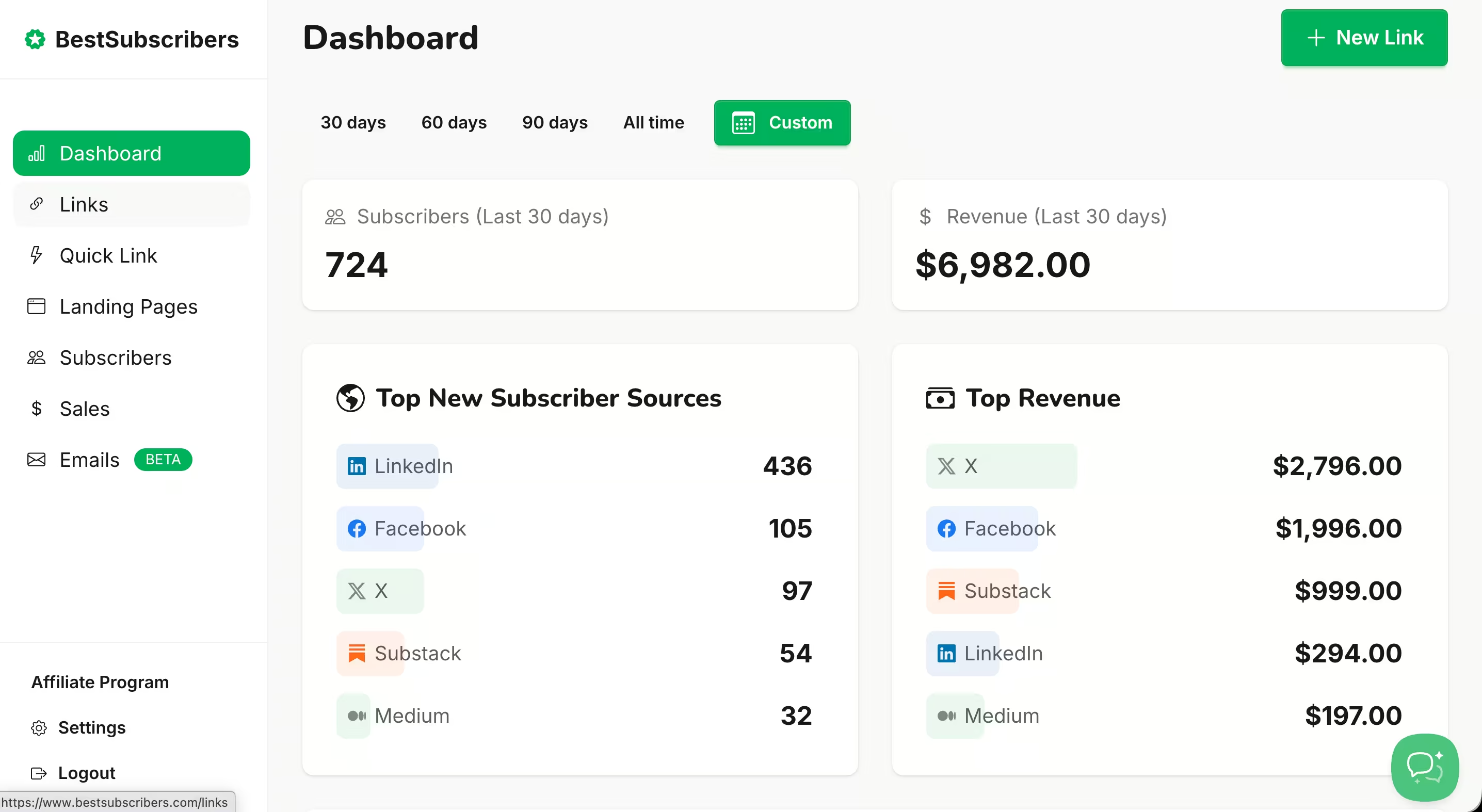
- X subscribers generated $2,796
- Facebook generated $1,996
- Substack $999
- And so on...
Now the decision is obvious. YouTube and podcasting are producing the vast majority of paying subscribers. Twitter and newsletter swaps are generating signups — but those signups aren't buying. The creator can confidently double down on what's working and reclaim the hours spent on what isn't.
Without this data, they'd keep spreading effort equally across all four channels, assuming more subscribers equals more revenue. It doesn't. The source matters as much as the size.
The metrics that matter
Once you're tracking the 3 S's, a few specific metrics become incredibly useful:
Revenue Per Subscriber by Source is total revenue generated divided by number of subscribers from that channel. This is the single most important metric for any newsletter creator making business decisions about where to spend their time. A channel that brings in 200 subscribers worth $15 each is more valuable than a channel that brings in 2,000 subscribers worth $0.50 each.
Subscriber Lifetime Value by Channel is the projected total revenue per subscriber, segmented by where they came from. This helps you understand the long-term quality of each channel, not just the first purchase.
Channel ROI compares the revenue a channel generates against the time or money you invested in it. If you're spending 10 hours a week on YouTube and it's generating $4,900/month, that's a very different ROI than spending 10 hours a week on Twitter for $400/month.
Time to First Purchase by Source measures how long it takes subscribers from each channel to buy something. This is a quality signal. If podcast subscribers buy within 3 weeks but Twitter subscribers take 6 months, that tells you something important about intent and trust levels by channel.
How to Set Up Subscriber Intelligence for Your Newsletter (Step by Step)
You can start tracking this manually. It takes some setup, and it gets messy at scale — but it works, and I want to show you exactly how before we talk about tools.
Step 1 — Tag every acquisition source with UTMs
UTM parameters are small tags you add to the end of a URL so you can track where clicks come from. If you've never used them, they look like this:
yoursite.com/newsletter?utm_source=youtube&utm_medium=video&utm_campaign=seo-tips-ep12
That URL tells your analytics: "This visitor came from YouTube, specifically from a video, specifically from episode 12 about SEO tips."
You need a tagged link for every channel where someone might find you and click through to your newsletter signup. That means your YouTube description links, podcast show notes links, social media bio links, newsletter swap partner links, and guest post author bios.
Free UTM builder tools like Google's Campaign URL Builder work fine for this. You paste in your destination URL, fill in the source/medium/campaign fields, and it spits out the tagged link.
The most important thing at this stage isn't the tool. It's consistency. Pick a naming convention and stick with it. If you call YouTube "youtube" in one link and "yt" in another, they'll show up as two separate sources in your data. Document your naming rules somewhere simple — even a sticky note works — and use them every time.
Step 2 — Connect your signup forms to source data
Once someone clicks your tagged link and lands on your signup page, the UTM data needs to follow them into your email platform. How this works depends on your platform:
On Kit, you can use tags or custom fields to capture UTM parameters when someone subscribes. This requires setting up your forms to pass through the URL parameters — it's not automatic.
On Substack, this is more limited. Substack doesn't natively capture UTM data on signups, which makes manual attribution harder on that platform.
On beehiiv, source tracking is built in. Their 3D Analytics capture channel, source, and medium automatically when someone subscribes through a tagged link.
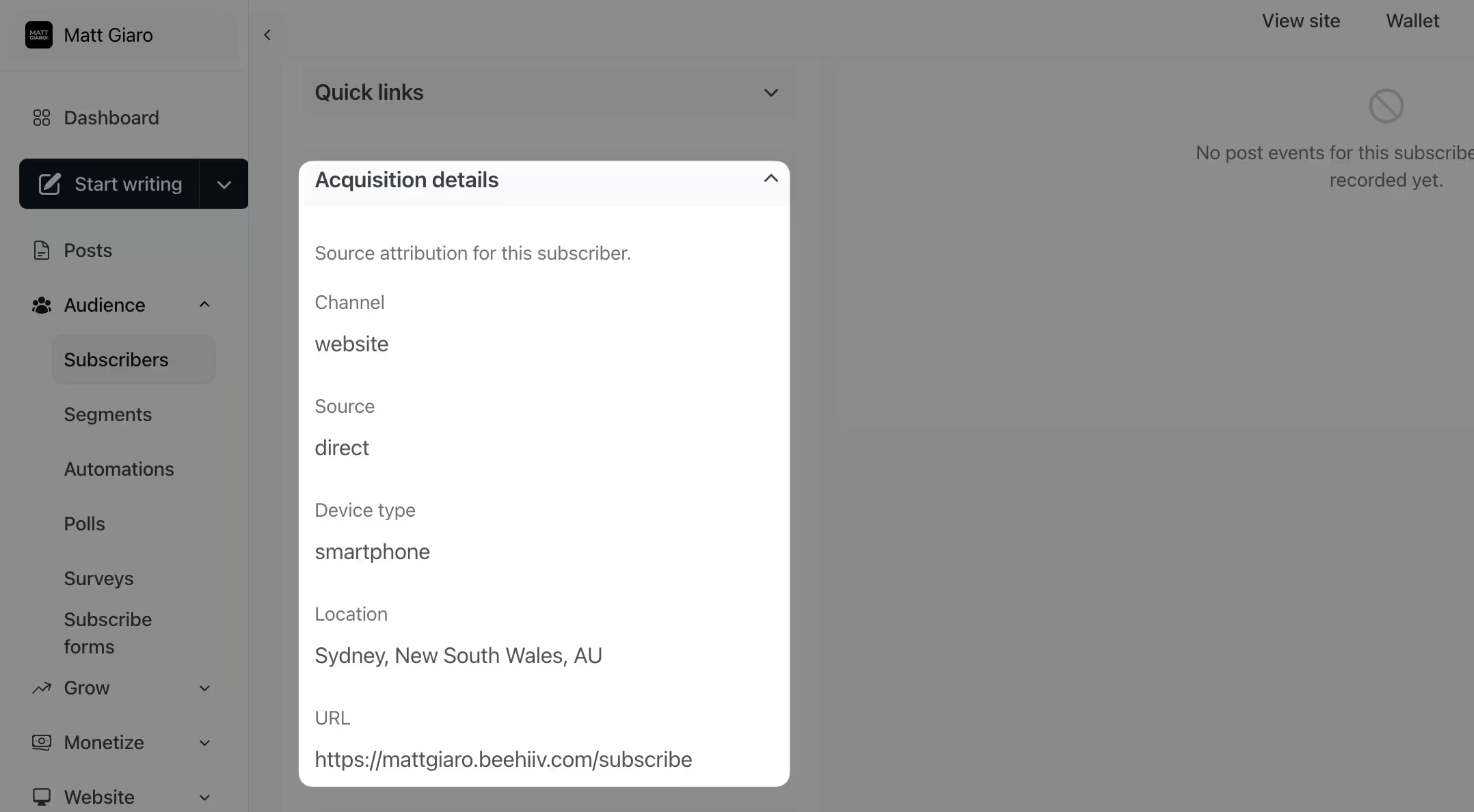
The gap most creators hit is right here: the UTM data exists in the URL, but it doesn't always carry over into the email platform cleanly. Some platforms capture it automatically, others require manual setup, and some don't support it at all.
Step 3 — Map revenue events back to subscriber source
This is where most manual setups break down.
"Mapping" means connecting the dots: when subscriber X buys your course, you need to know that subscriber X originally came from YouTube video Z. The sale needs to link back to the source.
To do this manually, you export your subscriber list from your email platform (with source tags attached), export your sales data from your payment processor (Stripe, Gumroad, Teachable, whatever you use), and match them by email address in a spreadsheet.
It looks something like: open both CSVs in Google Sheets, do a VLOOKUP or INDEX/MATCH on the email column, and pull the source tag into the sales sheet. Then you can build a pivot table showing revenue by source.
This genuinely works when you have 30 or 50 sales in a month. It becomes tedious at 100. It becomes a nightmare at 200+. And if you're doing this alongside a day job with limited time, spending 2–3 hours on spreadsheet matching every month starts to feel like a real cost.
Step 4 — Build a Subscriber Intelligence dashboard (manual version)
Once you've matched your revenue to sources, you want a simple dashboard that shows you four things: total revenue by channel (a bar chart is enough), revenue per subscriber by channel, time to first purchase by channel, and the trend over time so you can see if a channel is improving or declining.
Google Sheets or Airtable with pivot tables can handle this. Update it monthly at minimum, weekly if you're actively testing new channels or running campaigns.
This DIY approach is a legitimate starting point. Especially if you're early stage, have a small subscriber base, and want to understand the concept before investing in a tool. But be honest with yourself about whether you'll actually maintain it.
Why the Manual Approach Breaks (And When You Need a Dedicated Tool)
Everything above works. At small scale, with discipline, for a while. But there are real-world scenarios where the manual approach fails silently — and by the time you notice, you've lost data you can't recover.
UTM links don't survive platform changes
Maybe you start on Substack, grow to 5,000 subscribers, and decide to move to Kit or beehiiv for better monetization tools. All those subscribers you brought in? Their UTM source data probably won't migrate with them. You lose the history of where every single subscriber originally came from.
The same thing happens when you change landing pages, rebuild your website, or switch signup forms. The chain from Source to Subscriber breaks silently, and you don't realize it until you try to run a report months later and half your subscribers show up as "unknown source."
Manual tracking is inconsistent by default
Maybe you tag your YouTube links perfectly for three months. Then you publish a video in a rush and forget the UTM. That video goes semi-viral. Suddenly your best-performing acquisition source shows up as "direct/none" in your analytics.
And that's just the part you control. Podcast hosts don't always use the link you gave them. Newsletter swap partners use their own redirect URLs. Guest post editors strip your tracking parameters. The further the link gets from your hands, the more likely the tracking breaks.
The more channels you grow into, the more leaks appear. It's like trying to track water through a pipe system held together with tape. Every new connection is another potential leak.
Spreadsheet matching doesn't scale — and it lags
Exporting CSVs, matching by email, and building pivot tables takes real time. For a creator who works in a two-hour morning window, burning an hour on spreadsheet maintenance means losing half your creative output that day.
And the data is always old. By the time you sit down to run last month's report, you're looking in the rearview mirror. You can't see what's happening right now. You can't course-correct until the next month.
A dedicated tracking snippet solves all three problems
One snippet, installed once on your signup page. It tags every subscriber at the source level automatically — no manual UTM discipline required. The source data lives with the subscriber permanently, even if you switch email platforms. And revenue mapping happens in real time, not in a monthly spreadsheet session.
This is exactly what BestSubscribers does. One snippet, automatic source tagging, real-time revenue attribution across every monetization event. You install it once and your Subscriber Intelligence dashboard starts populating within days. Start a free trial here.
The manual approach to Subscriber Intelligence works — until you change platforms, forget a UTM tag, or run out of time to maintain spreadsheets. A dedicated tracking tool makes attribution automatic and permanent.
Subscriber Intelligence Tools Compared
If you're convinced you need this (and you probably do if you're monetizing a newsletter), here's an honest look at the options:
BestSubscribers is purpose-built for Subscriber Intelligence. One tracking snippet, automatic source tagging, real-time revenue-by-channel dashboard. Works with Kit, MailerLite, AWeber, and Go High Level. Connects to Stripe, Teachable, ThriveCart, LemonSqueezy, PayPal, and Gumroad for revenue tracking. $19/month flat. Designed specifically for newsletter creators. Free trial available.
beehiiv 3D Analytics is the best native platform analytics available. It tracks source, medium, and channel out of the box. But it doesn't connect that data to revenue outcomes, and it only works if you're on beehiiv.
SparkLoop has strong subscriber lifetime value data, but it's focused on referral and recommendation growth — not multi-channel acquisition attribution.
Google Analytics 4 + manual tagging is free, but it requires significant setup, ongoing maintenance, and doesn't natively track email subscriber revenue. It's built for websites, not newsletter businesses.
DataFast (datafa.st) is revenue-first web analytics that connects traffic sources to Stripe payments. Starts at $9/month. It's good at showing which pages and traffic sources generate revenue on your website — but it tracks website visitors, not email subscribers. There are no email platform integrations, so it can't tell you which subscribers came from where or connect subscriber source to purchases. A complementary tool for website-level data, not a replacement for subscriber-level attribution.
Most newsletter analytics tools track subscriber growth. Subscriber Intelligence tools track which growth actually makes you money.
For a deeper breakdown, see our full newsletter attribution tool comparison.
Common Mistakes That Break Your Subscriber Intelligence
A few pitfalls that trip up even creators who are actively trying to track this:
Tracking signups but ignoring revenue per source
This is the vanity metric trap. A channel that brings in 1,000 subscribers sounds impressive until you realize those subscribers never buy anything. Meanwhile, another channel brought in 50 subscribers who collectively generated $3,000 in revenue.
The whole point of Subscriber Intelligence is connecting source to dollars, not source to signup count. If you're celebrating subscriber numbers without looking at revenue by source, you're optimizing for the wrong thing.
Waiting until you have "enough" subscribers to start tracking
This is the most common and most costly mistake. If you start tracking attribution at 5,000 subscribers, you've already lost the source data on every subscriber who came before that point. That's potentially months or years of blind spots you can never recover.
The best time to set up Subscriber Intelligence is before you need the data. Even if you only have 100 subscribers, start tagging now. Future you will be grateful.
Assuming your email platform handles this for you
Kit shows you which form someone signed up through. Maybe some UTM or referer if you're lucky. Substack shows you total revenue. beehiiv shows you source channels. But none of them connect the full chain from Source to Subscriber to Sale. Each platform gives you one piece. None give you the complete picture.
If you want to know which channels produce subscribers who pay, you need a layer on top of whatever platform you're using.
Start Tracking What Actually Matters
The difference between growing a newsletter and growing a newsletter business is Subscriber Intelligence — knowing where your revenue actually comes from.
You don't need to have it all figured out today. Start with one step: tag your top 3 traffic sources with UTM links this week. Even that gives you more data than most creators ever collect.
And if you'd rather skip the spreadsheets and get Subscriber Intelligence working from day one, start your free BestSubscribers trial.
Install one snippet.
Create unlimited tracking links.
And see which channels actually bring in subscribers who pay.
Try it for free.
(And if you don't like it, cancel within 14 days and you won't pay a penny.)

Ready to see which content makes you money?
Stop guessing. Start tracking content to revenue.
Start Free Trial