 BestSubscribers
How to Track Newsletter Revenue by Source (Step-by-Step Guide)
Maybe you've got revenue coming in from your newsletter. Courses, paid subscriptions, coaching, digital products — money is flowing in.
But you have no idea which growth channel those paying subscribers originally came from.
You can see total revenue. You can see total subscribers. But the connection between "where someone found me" and "whether they ever paid me"? Completely invisible.
This guide walks through the exact steps to start tracking newsletter revenue by source. From setting up your first tracking links to building a dashboard that shows you which channels actually produce paying subscribers.
This is what we call Subscriber Intelligence — tracking the 3 S's: Source, Subscriber, Sale. It's the practice of connecting your acquisition channels to the revenue they actually generate.
Let's get into it.
Why tracking total revenue isn't enough
Knowing your total monthly revenue is good. But it doesn't help you make decisions.
Think of it like a store owner who knows they made $12,000 last month but has no idea which products brought in the profit. They can't decide what to restock. They can't cut what's dead weight. They're guessing.
That's what most creators are doing with their newsletter growth.
You might be posting on YouTube, tweeting three times a day, doing podcast interviews, running newsletter swaps, and writing guest posts. Revenue is coming in. But which of those activities is actually responsible for the dollars?
Without that answer, you're spreading your time equally across everything. And time is the one thing you probably don't have a surplus of.
Here's a quick example.
Two creators both making $5,000/month. Creator A tracks revenue by source and discovers YouTube drives 70% of that income. So they double down on YouTube and cut two other channels that produce almost nothing.
Creator B doesn't track anything. They keep splitting effort across five channels equally. Revenue stays flat. They work harder and get nowhere.
Same revenue. Completely different trajectory.
Tracking total newsletter revenue without knowing which channel it came from is like knowing your salary without knowing which client pays you. You can't make smart decisions without the breakdown.
Step 1 — Set up tracking links for every acquisition channel
Before you can track where subscribers come from, you need a way to tag each channel. That's where UTM parameters come in.
If you've never used them, don't worry. They're simpler than they sound.
UTMs are just extra bits of text added to the end of a URL. When someone clicks that tagged link and subscribes, you know exactly where they came from.
There are three UTM fields that matter for newsletter creators:
utm_source— the platform (youtube, podcast, twitter, linkedin, etc.)utm_medium— the content type (video, social, guest-post, show-notes, etc.)utm_campaign— optional, for a specific episode, post, or collab
What this looks like in practice
Here are some real examples. Say your newsletter signup page is yourdomain.com/subscribe. Here's how you'd tag links for different channels:
- YouTube description:
yourdomain.com/subscribe?utm_source=youtube&utm_medium=video - Podcast show notes:
yourdomain.com/subscribe?utm_source=podcast&utm_medium=show-notes - Twitter/X bio:
yourdomain.com/subscribe?utm_source=twitter&utm_medium=social - Newsletter swap partner:
yourdomain.com/subscribe?utm_source=partnername&utm_medium=newsletter-swap - Guest post author bio:
yourdomain.com/subscribe?utm_source=sitename&utm_medium=guest-post
You can use a tool like datafa.st to generate and manage these links. It handles the formatting so you don't have to manually piece together URL strings every time.
The #1 rule: naming consistency
This is where most people trip up immediately.
If you tag one link as youtube, another as YouTube, and a third as yt — those show up as three completely separate sources in your data. Your reports become a mess.
Pick a naming convention and write it down. Lowercase. No spaces. Consistent every time.
Simple document. Three columns: source name, medium name, example URL. Refer to it before creating any new link. This takes five minutes and saves you from corrupted data down the road.
Step 2 — Configure your email platform to capture source data
You've got tagged links. Now your email platform needs to actually grab that source information when someone subscribes.
This part varies by platform. Some make it easy. Some make it painful. Let's walk through the major ones.
Kit (ConvertKit)
Kit doesn't automatically capture UTM parameters from your signup URLs. You have to set it up manually.
Create custom fields in your account (like "source" and "medium"). Then configure your signup forms to pull those values from the URL and save them to each subscriber's profile.
You can also use tags as a workaround — create a tag for each major source and apply it via automation rules. It's less precise than custom fields but works in a pinch.
The limitation: this requires some setup for each form, and it's easy to miss a step. If you add a new form later and forget to configure it, those subscribers come in with blank source data.
beehiiv
beehiiv has the best native analytics of any newsletter platform right now. Their 3D Analytics automatically capture source, medium, and channel for every subscriber.
You don't need to configure anything. It works out of the box.
The catch: beehiiv shows you where subscribers came from, but it doesn't connect that data to revenue. You can see that 200 subscribers came from YouTube, but you can't see how much money those 200 subscribers generated over time.
It covers two of the three S's — Source and Subscriber — but not Sale.
Substack
This is Substack's weakest point. There's no native UTM capture. No custom fields. No way to tag subscribers by acquisition source inside the platform.
If you're on Substack and want source tracking, your options are limited. You'd need an external landing page that captures the UTM data and then redirects to your Substack subscribe page. Or you'd need a third-party tool that handles the tagging layer for you.
Being honest here — if source-level tracking matters to you (and it should), Substack makes it harder than any other major platform.
Mailchimp, MailerLite, and others
Most established email platforms support hidden fields on signup forms. These fields can pull values from the URL parameters and store them on the subscriber record.
The setup varies by platform. Check your provider's documentation for "hidden fields" or "URL parameter capture" on forms. The concept is the same everywhere: grab the UTM values from the link and store them with the subscriber.
Step 3 — Connect your payment processor to your subscriber data
This is where most creators hit a wall.
Your email platform knows where subscribers came from (if you set up step 2). Your payment processor — Stripe, Gumroad, Teachable, Thrivecart, whatever you use — knows who bought and how much they paid.
But those two systems don't talk to each other automatically.
The connection between where a subscriber found you and whether they eventually paid you is the most important data point most creators never track.
Let's fix that.
The manual method
Before you can match anything, you need the data flowing into one place.
That means setting up automations to pull new subscriber data into a Google Sheet every time someone signs up. Depending on your email platform, you'd use something like Zapier, Make, or ActivePieces to create a connection that says "when a new subscriber is added, send their email and source fields to this spreadsheet."
Then you need to do the same thing for your sales. Every time someone buys, that purchase needs to land in a sheet too.
If you only use one payment processor, that's one connection. But maybe you sell a course through Teachable, coaching through Stripe, and a digital product through Gumroad. That's three separate automations — each pulling sales data into its own tab or sheet.
Just getting all the pipes connected takes a few hours at minimum.
And if anything breaks — a Zapier step fails, a field name changes, a new form doesn't have the right automation attached — you get gaps in your data without realizing it.
Once the data is flowing, here's how the matching works.
Export your subscribers from the sheet (or directly from your email platform) as a CSV file. Make sure the source/medium fields are included.
Export your customers from your payment processor as another CSV file. You need email addresses and purchase amounts.
Then use VLOOKUP or INDEX/MATCH to connect them by email address.
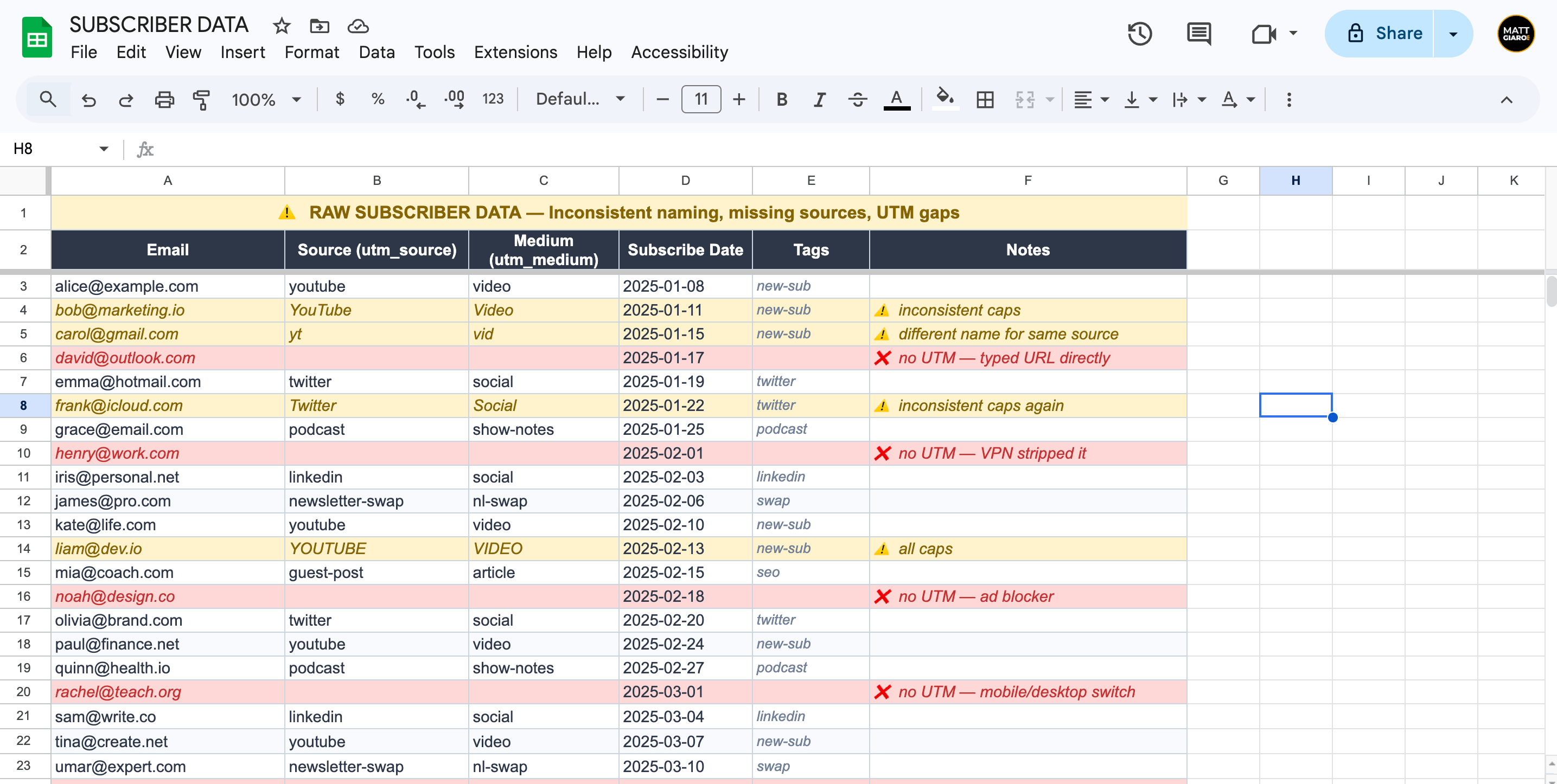
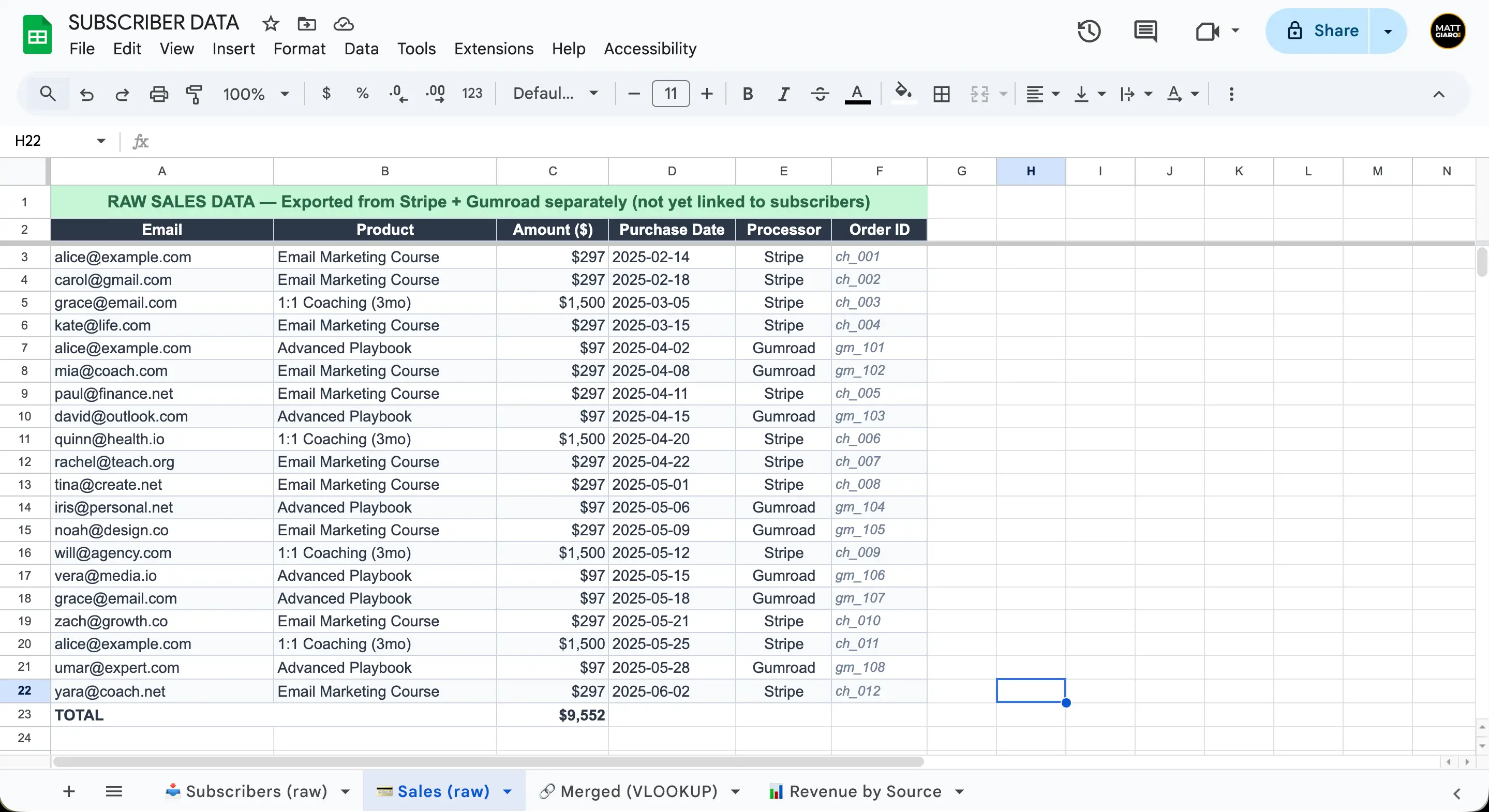
Here's a simplified version of what this looks like:
Subscriber export (Tab 1):
Sales export (Tab 2):
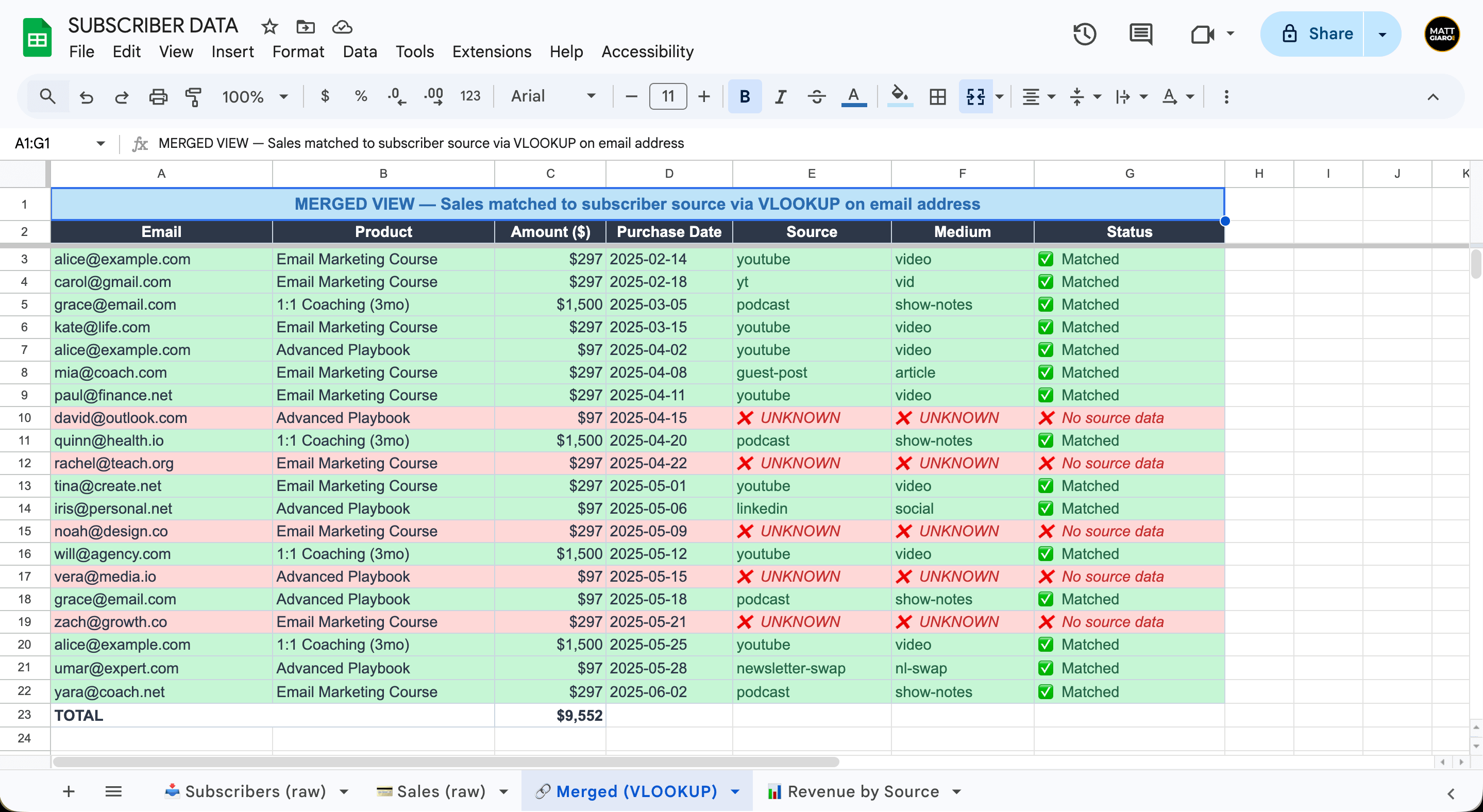
Merged result (Tab 3):
Use =VLOOKUP(A2, 'Tab 1'!A:D, 2, FALSE) to pull the source for each buyer.
Now you can see it.
Jane came from YouTube and bought your course. Sara came from your podcast and signed up for coaching.
The honest limitations of this approach
It works. But it's slow.
You're looking at 2-3 hours of spreadsheet work every month. The data is always stale by the time you finish. If you sell multiple products, the matching gets complicated fast. And if your naming conventions were inconsistent in step 1, the data is unreliable.
At small scale — under 500 subscribers, one or two products — this is totally fine. It's a legitimate way to start.
At larger scale, it breaks down.
And then the matching itself falls apart
Even when the data is flowing and the spreadsheet is set up, the actual matching introduces its own set of problems that get worse over time.
People buy with different email addresses. Someone subscribes to your newsletter with their personal Gmail. Three months later, they buy your course using their work email. Your VLOOKUP matches on email address — so that sale just sits there in your payment data with no corresponding subscriber record. Revenue with no source. And you don't even realize it's missing unless you manually eyeball both lists line by line.
This isn't some edge case. Think about your own behavior. How many email addresses do you use across different services? Your subscribers are doing the same thing.
Payment plans multiply the mess. Someone buys your $600 course in 3 monthly installments. That's 3 separate rows in your Stripe export, not one. Do you attribute $600 to their source or $200 three times? If they stop paying after the second installment, do you go back and correct the total? Every payment plan adds rows and decisions to your matching process.
Refunds break old data. You matched a $200 sale to a YouTube subscriber last month. This month they request a refund. Now you need to go back into your merged spreadsheet and subtract that revenue from the YouTube column. If you're doing this quarterly, you're redoing work you already did — cross-referencing old matches against new refund records. Miss one refund, and your source numbers stay inflated.
Re-subscribers muddy the source. Someone subscribes from your podcast, unsubscribes 3 months later, then re-subscribes 6 months after that from a Twitter post. Which source gets credit? Most email platforms overwrite the original subscriber record or create a duplicate. Either way, the source data from their first subscription — the one that actually built the relationship — is gone.
Each of these issues is manageable on its own. But they stack. You've got email mismatches hiding revenue, payment plans multiplying rows, refunds requiring backward corrections, and re-subscribers overwriting source data. Now try running your monthly VLOOKUP merge across all of that.
What started as a 2-3 hour spreadsheet job turns into a half-day forensic exercise. And you're still not confident the numbers are right.
The bigger problem: UTM tracking has holes
Even if you nail the manual process and wrestle through all the matching issues above, there's a deeper problem. UTM-based tracking itself is leaky.
- Ad blockers strip UTM parameters from URLs before your signup form ever sees them.
- VPNs mask referral data.
- Some platforms — especially social apps — strip or rewrite URL parameters when users click links.
- Mobile browsers sometimes drop them during redirects.
Then there's human behavior. Someone sees your YouTube video on their phone, types your URL directly into their laptop later, and subscribes. No UTM. No source data. That subscriber shows up as "direct" — which really just means "unknown."
Then there's the biggest blind spot of all: organic search.
Someone finds your blog post through Google. They read it, like it, and subscribe to your newsletter right there on the page. Great — new subscriber.
But where did they actually come from? Google? Bing? DuckDuckGo? You have no idea — because organic search traffic doesn't carry UTM parameters. Nobody's clicking a tagged link. They're clicking a search result.
Google Analytics can tell you that a visitor arrived from google.com. But it gives you a session, not an email address. Your email platform gives you the email address, but has no clue how that person reached your site. The two systems are staring at the same person from opposite sides of a wall.
So you know someone came from Google and you know someone subscribed. You just can't prove it was the same person.
And it gets messier. Google regularly appends its own tracking parameters to URLs — things like &sxsrf=, &ved=, or redirect wrappers when someone clicks from a featured snippet or "People Also Ask" box. These extra parameters can interfere with your own UTM tags or make your URLs look completely different from what you set up. Your carefully structured tracking link arrives at your form looking like a URL that went through a blender.
Every one of these scenarios creates a subscriber with no source attached. And once that data is missing, you can't get it back.
I ran this kind of system for five years. Tagged everything. Maintained my naming conventions. Did the monthly spreadsheet exports.
And when I finally checked the numbers, I had $81,000 in revenue with no source attached. Eighty-one thousand dollars I couldn't trace back to any acquisition channel.
That number is actually worse than it sounds. Many of those untracked subscribers were repeat buyers — people who bought a course, then coaching, then another product. So the real unattributed revenue was even higher.
When a chunk of your revenue that large is invisible, your "data-driven" channel decisions are based on incomplete information. You might be doubling down on the wrong channel because the right one's data is full of gaps.
This is why I built BestSubscribers.
It captures acquisition source at the moment of signup using a tracking snippet — not just UTM parameters — and maps that source to every revenue event in real time. No monthly exports. No VLOOKUP formulas. No stale data.
And far fewer gaps than a UTM-only approach.
Step 4 — Build your revenue-by-source dashboard
Once the data is connected (either manually or through a tool), you need somewhere to actually look at it.
Your dashboard should answer one question: which channels bring in paying subscribers?
Here's what to include:
- Revenue by channel. Total dollars generated by subscribers from each source. This is your headline number.
- Revenue per subscriber by channel. Divide revenue by the number of subscribers from that source. This tells you about subscriber quality, not just volume. A channel that sends you 50 subscribers who generate $2,000 is more valuable than one that sends 500 subscribers who generate $200.
- Number of paying subscribers by channel. How many subscribers from each source have ever made a purchase?
- Time to first purchase by channel. How long does it take, on average, for a subscriber from each source to buy something? YouTube subscribers might buy within 30 days. Twitter subscribers might take 6 months. This shapes your expectations.
How to build it yourself
Google Sheets with pivot tables works. Kinda.
Create a tab with your merged data from step 3. Add a pivot table that groups by source and sums revenue. Add another pivot that counts unique paying emails by source.
It's manual. It's basic. But it gives you the numbers.
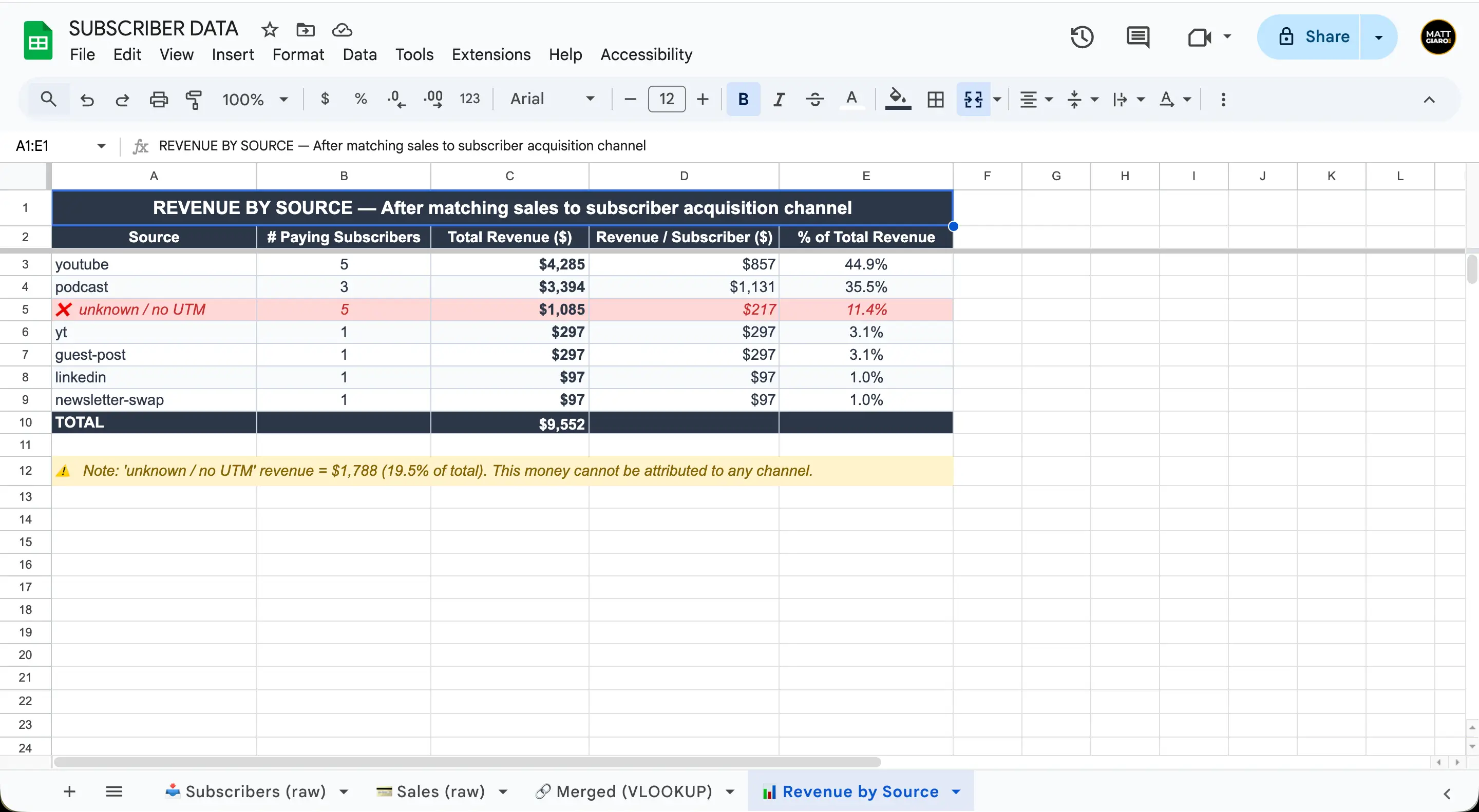
BestSubscribers generates this dashboard automatically from the tracking snippet. Real-time data, no pivot tables required.
Step 5 — Act on the data
The dashboard is useless if it doesn't change your behavior.
This is where revenue-by-source tracking actually pays off. You have the numbers. Now make decisions.
If one channel produces high revenue per subscriber
Increase your investment there. Create more content on that platform. Spend more time on it. This is your proven winner.
Maybe YouTube subscribers generate 4x the revenue of any other channel. That's a clear signal to prioritize video. Not because YouTube is "better" in general — but because it's better for your business specifically.
If a channel brings lots of subscribers but low revenue
Don't cut it immediately. Investigate first.
Are you attracting the wrong audience on that channel? Is there a mismatch between what you promise in your content and what you sell? Are those subscribers just newer and haven't had time to buy yet?
Sometimes a high-volume, low-revenue channel just needs a different content angle. Sometimes it genuinely brings in people who will never buy. The data helps you figure out which.
If a channel is new and data is thin
Give it 90 days before making any decisions. Small sample sizes lie.
If you got 15 subscribers from a podcast interview last month and none have bought yet, that doesn't mean podcast listeners don't convert. It means you don't have enough data yet.
Patience here is important. Track the data. Let it accumulate. Then decide.
Review quarterly
Channels change over time. A podcast that drove significant revenue 6 months ago might be stale now. A Twitter strategy that didn't work before might start clicking after you changed your approach.
Set a quarterly calendar reminder to review your revenue-by-source data and adjust your channel strategy accordingly.
Common questions about tracking newsletter revenue by source
Not with Substack's built-in tools. Substack doesn't capture acquisition source data natively. You'd need an external landing page with UTM capture that redirects to Substack, or a third-party tracking tool. This is one of Substack's biggest analytics gaps.
No. Google Analytics 4 tracks website behavior — which pages people visit, how they got to your site, what buttons they click. That's a different problem than tracking which subscribers generate revenue. GA4 can tell you where website traffic comes from, but it can't connect a specific subscriber to the revenue they generate 6 months later.
Start tracking from day one. You cannot backfill subscriber source data after the fact. If you wait until you have 5,000 subscribers to start tagging acquisition sources, those first 5,000 subscribers are a black box forever. You'll never know where they came from. The earlier you start, the richer your data when it's time to make decisions.
Subscriber Intelligence works across all of them. Paid newsletters, courses, coaching, digital products, memberships — every sale maps back to the original acquisition source. A subscriber who came from YouTube and buys your course, then your coaching, then your membership? All three revenue events trace back to YouTube.
Wrapping up
Can you track newsletter revenue by source manually?
Yes.
Is it reliable? Nope.
Between email mismatches, payment plan headaches, refund corrections, re-subscriber overwrites, UTM gaps, and the organic search blind spot — you're spending hours every month building a picture that's still full of holes. You end up with a spreadsheet that looks like data but doesn't tell you the truth.
Is it the best usage of your time? Nope.
Every hour you spend wrestling with VLOOKUP formulas and CSV exports is an hour you're not creating content or serving your audience. That's the real cost.
For less than 5 lattes a month, BestSubscribers gives you real attribution — automatically. One tracking snippet. Real-time revenue by source. No spreadsheets. No stale data. No guessing which channel actually makes you money.
For the full framework behind everything in this guide, read our complete guide to Subscriber Intelligence.
But if you read enough and just want something that works...Start your free trial now and stop flying blind.

Ready to see which content makes you money?
Stop guessing. Start tracking content to revenue.
Start Free Trial